One-click upsells for Nordic stores

The second sale,
one tap away.

After the customer pays, Ark shows one curated offer. They tap once and it's charged to the same card, Klarna or Apple Pay. No second checkout, no re-entering anything.

Works withVisaMastercardKlarnaApple PayGoogle PayPayPalSwishVippsMobilePaySvea

The offer lands on orders you have already won. See how it works →

1 tap
Nothing re-entered
8 methods
Card to Swish
1 box
Same order, one delivery
How it works

Consent at checkout.
Charge on the thank-you page.

01

They pay once.

At checkout Ark saves the buyer's consent with the payment: the card, the Klarna authorization, the Apple Pay token. Nothing extra is asked of them.

02

You show one offer.

On the thank-you page, one curated product. Not a pop-up, not a cart: a real offer with a price and a reason it belongs in the same box.

03

They tap. It's charged.

The upsell is charged off-session to the same method and appended to the same order. One order, one shipment, one receipt.
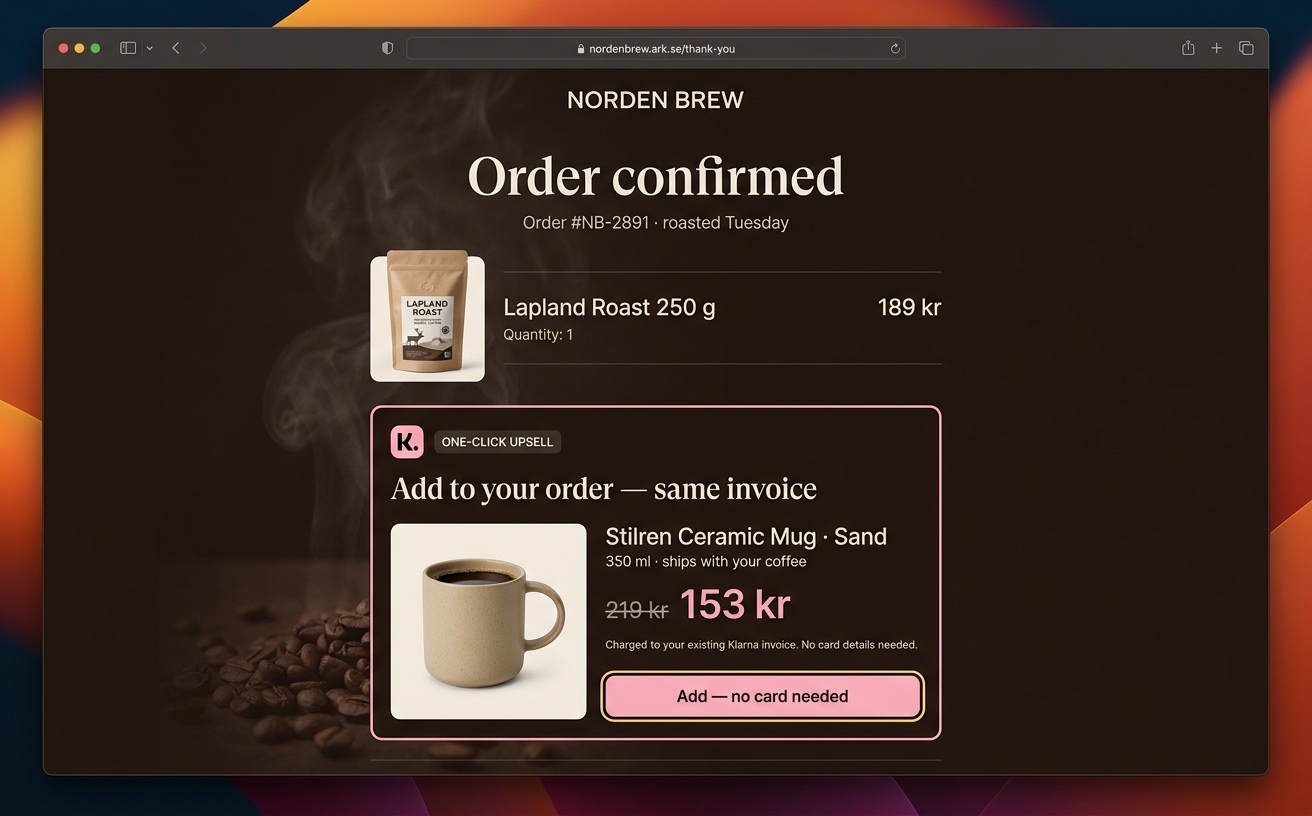
Ark thank-you page with a one-click Klarna upsell for a ceramic mug
Every way Nordic buyers pay

Not just cards.
Klarna, wallets, Swish, invoice.

Most upsell tools only work after a plain card payment. In the Nordics that is a minority of your orders. Ark keeps the offer live on every method, and tells you exactly how each one behaves.

Card

One tap

Visa, Mastercard, Amex. The card is saved at checkout and the upsell is charged off-session, with 3-D Secure only if the bank insists.

Klarna

One tap

The Klarna authorization is tokenized when they pay. The upsell goes onto the same Klarna account, no new Klarna flow.

Apple Pay

One tap

The wallet card is saved at the first payment. The upsell charges it directly, no Face ID prompt for the add-on.

Google Pay

One tap

Same as Apple Pay: the tokenized card is reused for the add-on charge.

PayPal

One tap

A billing agreement is created at checkout, so the add-on is charged without sending the buyer back to PayPal.

Invoice

One tap

Svea invoice and part-payment. The credit-checked identity carries over, and the add-on lands on the same invoice.

Swish

Confirm in app

The buyer gets a Swish prompt for the add-on amount and approves it in the app. No card, no form.

Vipps · MobilePay

Confirm in app

Same as Swish: one approval in the wallet app for the add-on amount.

Runs on your own account atPayouts land in your bank as usual.
Why your upsell app underperforms

Shopify shows the offer
to card payers only.

Shopify's post-purchase page is skipped whenever the buyer paid with Klarna, PayPal, a wallet or a local method. On a Nordic store that is most of the orders, so most buyers never see your offer. Ark shows it to all of them.

post-purchase page
Offer shown on 2 of 10
Ark thank-you page
Offer shown on 10 of 10
The whole funnel, built in

One tap on the thank-you page
is only the start.

Every place a second sale can happen, in one place, with one set of analytics. No bundle app, no bump app, no subscription app.

Pre-checkout

In-cart offer

A matching add-on in the cart drawer, before checkout. Accepted straight into the cart.

In checkout

Order bump

One tick-box on the payment step: gift wrap, a refill, the 2-pack. Paid in the same transaction.

Thank-you page

Downsell

Declined? Show a smaller or cheaper version once. Accepted parents skip it automatically.

Recurring

Subscribe & save

Offer the refill as a subscription. Ark charges the saved method every N days and handles failed payments.

Thank-you page

Two-product bundle

A bundle box with its own sizes and prices, resolved server-side so the amount can never be tampered with.

  • Size and colour picker on the offer itself
  • Headline A/B tests per offer, accepts counted per variant
  • Fulfillment hold until the funnel ends, so it ships as one box
  • Take-rate, AOV lift and revenue per offer in Analytics
Subscriptions as upsells

Turn the refill into
recurring revenue.

The thank-you page is the moment of highest intent. Offer the refill as subscribe & save, and one tap starts a subscription charged to the same saved card, Klarna or wallet. No account to create, no second checkout.

  • Any post-purchase offer can be recurring: pick the interval, Ark does the rest
  • Recurring terms sit next to the button, as the card networks and PayPal require
  • Failed renewals retry on days 1, 3 and 5 before anyone is bothered
  • Buyers get renewal, failure and cancellation emails, plus a portal to manage it
  • Subscribers, renewals and cancellations show up in the dashboard with the rest of your upsells
One-click add-onVisa
Lapland Roast coffee bag
Lapland Roast 250 g
Never run out. Fresh roast on your doorstep.
Charged 161 kr to your saved Visa every 30 days until you cancel. Cancel anytime from your account.
Social proof in checkout

Reviews where
the doubt happens.

Most stores keep their reviews on the product page and send the buyer into a bare checkout. Ark carries the proof through: your Trustpilot rating, real customer reviews and trust chips sit next to the pay button, and again on the offer page.

  • Reviews are lifted from your storefront automatically, no re-typing
  • Trustpilot score and review count above the reviews, with a click-out to your page
  • Secure-checkout and money-back chips next to the pay button, translated per market
  • Offer page blocks: star rating, featured review, testimonials, before/after, guarantee
  • Every block is a toggle in the editor, and the operator can write them for you
The AI sets it up

Say what to offer.
It builds the funnel.

You don't configure upsells in Ark, you ask for them. The operator creates the offer, the downsell and the headline test, and reports back with numbers.

  • Picks the offer from your catalog and order history
  • Writes the headline, the reason and the price
  • Builds the downsell and the bundle in the same pass
  • Reads take-rate and tells you what to change
✦ Ark Assistant
Add a post-purchase upsell: Björk Candle 3-pack at 20% off. Test two headlines.
✓ created post-purchase upsell · Björk 3-pack · 479 kr
✓ added downsell · single Björk Candle · 15% off
✓ launched headline test · 2 variants
Done. The 3-pack shows after every candle order, the single is the downsell, and I'm testing “Complete the set” against “Ships in the same box”. I'll keep the winner.
Which offer converts best?Add a subscribe & save offerWhy did take-rate drop?
✦Ask Ark to do anything…↑
Run the numbers

Revenue on orders
you already won.

No extra ad spend, no new traffic. Every accepted offer is margin on a customer who was already paying. Put in your own volume and take-rate.

Your store
Extra upsell revenue / month33 660 kr
Ark takes 1% of everything it processes, base orders and upsells alike: about 4 837 kr / month on 483 660 kr. The upsells alone cover that 7× over. Full ROI calculator with margins →

Upsells included. The whole store included. $99 a month.

One flat price for the platform, plus 1% of the revenue we process. No per-app fees, no upsell-app subscription on top.

Works withStripeAdyenMollieAirwallexPayPalSveaCheckout.comWhop
Starter
Everything to launch and grow your first store
$99/month
Request access
  • One-click post-purchase upsells on card, Klarna, Apple Pay, Google Pay, PayPal and invoice
  • Swish, Vipps and MobilePay upsells with in-app approval
  • Order bumps, in-cart offers, downsells, bundles, subscribe & save subscriptions
  • Social proof in checkout: Trustpilot row, reviews and trust chips next to the pay button
  • AI operator builds and tests the offers for you
  • Nordic checkout on your own payment-provider account, payouts straight to your bank
  • First-party analytics: take-rate, AOV lift, revenue per offer
  • Storefront, products, migration and custom domain included
  • 1 storefront · up to 1,000 orders / month
+ 1% of revenue we process
A flat 1% on the orders we process for you, upsells included, added to your monthly invoice. No per-app fees, no surprises.
Same on every plan

Straight answers on one-click.

What operators ask before they turn it on.

Correct. At checkout Ark stores a reusable handle with the payment: a saved card, a Klarna authorization, the Apple Pay or Google Pay token, a PayPal billing agreement, or the credit-checked identity on an invoice. The add-on is charged to that handle. The only exceptions are Swish, Vipps and MobilePay, which have no saved handle: there the buyer approves the add-on amount in the app, still with nothing typed.
Your next order is already paid

Turn it on before
the next one lands.

Connect your payment account, pick an offer or let the operator pick it, and every thank-you page starts earning.

Your own PSP · Cancel anytime · See the whole platform →